Sabtu, 15 Oktober 2011

Memanfaatkan Webcam Sebagai Security System

Memanfaatkan Webcam Sebagai Security System

Manfaat webcam ternyata dapat juga digunakan sebagai security siste

Bagi anda yang memiliki laptop atau komputer dengan fasilitas webcam yang terpasang, dapat memanfaatkan kamera sebagai proteksi komputer anda.
Setelah anda install software maka saat anda tidak menggunakan komputer selama waktu yang ditentukan, maka komputer akan menguci system anda, dan anda dapat membuka komputer anda dengan menghadapkan wajah anda ke hadapan kamera, dan kamera webcam anda akan mendeteksi wajah anda, dan bila cocok dengan model yang telah ditetapkan, maka system komputer akan terbuka dengan sendirinya.
Cara menggunakan
  1. Download dan Install programnya
  2. Buka program dengan mengklik kanan icon tray yang ada di sebelah kanan bawah, lalu klik Setting.
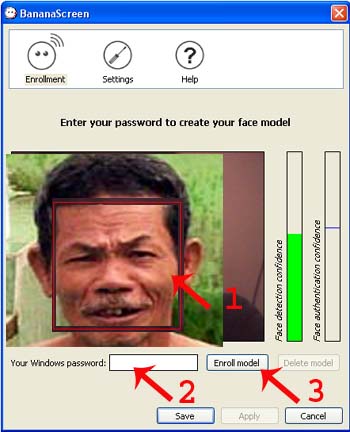
  3. Pada jendela baru yang tampil anda akan melihat tampilan wajah anda di deteksi oleh webcam, pilih atur model yang anda inginkan (lihat gambar Panah 1).
  4. Kemudian masukkan pasword login ke komputer anda pada kotak teks Your Windows Login (Lihat Gambar Panah 2)
  5. Kemudian klik tombol Enrol Mode (Lihat Gambar Panah 3)
  6. Untuk Mengatur Waktu yang diinginkan klik Menu Setting (lihat Gambar Obeng diatas)
  7. Pada jendela baru Masukkan nilai waktu (dalam detik) yang anda inginkan pada kotak teks “Delay of inactivity before locking the session”
  8. Lalu klik Tombol Save.
  9. Misalkan anda mengatur waktu 5 ata 10 detik, maka dalam waktu tersebut komputer tidak digunakan maka komputer anda akan terkunci, untuk membuka system anda hadapkan wajah anda kehadapan kamera, kamera akan mendeteksi wajah anda, dan bila tepat dengan model yang anda simpan tadi maka system akan terbuka dengan sendirinya.
  10. Bila kamera tidak dapat mendeteksi wajah anda dengan tepat, jangan khawatir, anda dapat membuka system dengan memasukkan pasword login komputer anda.
DOWNLOAD 1
DOWNLOAD 2

SUMBER:

Sabtu, 08 Oktober 2011

Windows XP Command list

It will help you through the problem you have in your windows actually, perhaps..

Run Commands:
  • compmgmt.msc - Computer management
  • devmgmt.msc - Device manager
  • diskmgmt.msc - Disk management
  • dfrg.msc - Disk defrag
  • eventvwr.msc - Event viewer
  • fsmgmt.msc - Shared folders
  • gpedit.msc - Group policies
  • lusrmgr.msc - Local users and groups
  • perfmon.msc - Performance monitor
  • rsop.msc - Resultant set of policies
  • secpol.msc - Local security settings
  • services.msc - Various Services
  • msconfig - System Configuration Utility
  • regedit - Registry Editor
  • msinfo32 _ System Information
  • sysedit _ System Edit
  • win.ini _ windows loading information(also system.ini)
  • winver _ Shows current version of windows
  • mailto: _ Opens default email client
  • command _ Opens command prompt

Run Commands to access the control panel:
  • appwiz.cpl -Add/Remove Programs control
  • timedate.cpl -Date/Time Properties control
  • desk.cpl -Display Properties control
  • findfast.cpl -FindFast control
  • inetcpl.cpl -Internet Properties control
  • main.cpl keyboard -Keyboard Properties control
  • main.cpl -Mouse Properties control
  • mmsys.cpl -Multimedia Properties control
  • netcpl.cpl -Network Properties control
  • password.cpl -Password Properties control
  • mmsys.cpl sounds -Sound Properties control
  • sysdm.cpl -System Properties control

Command Prompt:
  • ANSI.SYS Defines functions that change display graphics, control cursor movement, and reassign keys.
  • APPEND Causes MS-DOS to look in other directories when editing a file or running a command.
  • ARP Displays, adds, and removes arp information from network devices.
  • ASSIGN Assign a drive letter to an alternate letter.
  • ASSOC View the file associations.
  • AT Schedule a time to execute commands or programs.
  • ATMADM Lists connections and addresses seen by Windows ATM call manager.
  • ATTRIB Display and change file attributes.
  • BATCH Recovery console command that executes a series of commands in a file.
  • BOOTCFG Recovery console command that allows a user to view, modify, and rebuild the boot.ini
  • BREAK Enable / disable CTRL + C feature.
  • CACLS View and modify file ACL's.
  • CALL Calls a batch file from another batch file.
  • CD Changes directories.
  • CHCP Supplement the International keyboard and character set information.
  • CHDIR Changes directories.
  • CHKDSK Check the hard disk drive running FAT for errors.
  • CHKNTFS Check the hard disk drive running NTFS for errors.
  • CHOICE Specify a listing of multiple options within a batch file.
  • CLS Clears the screen.
  • CMD Opens the command interpreter.
  • COLOR Easily change the foreground and background color of the MS-DOS window.
  • COMP Compares files.
  • COMPACT Compresses and uncompress files.
  • CONTROL Open control panel icons from the MS-DOS prompt.
  • CONVERT Convert FAT to NTFS.
  • COPY Copy one or more files to an alternate location.
  • CTTY Change the computers input/output devices.
  • DATE View or change the systems date.
  • DEBUG Debug utility to create assembly programs to modify hardware settings.
  • DEFRAG Re-arrange the hard disk drive to help with loading programs.
  • DEL Deletes one or more files.
  • DELETE Recovery console command that deletes a file.
  • DELTREE Deletes one or more files and/or directories.
  • DIR List the contents of one or more directory.
  • DISABLE Recovery console command that disables Windows system services or drivers.
  • DISKCOMP Compare a disk with another disk.
  • DISKCOPY Copy the contents of one disk and place them on another disk.
  • DOSKEY Command to view and execute commands that have been run in the past.
  • DOSSHELL A GUI to help with early MS-DOS users.
  • DRIVPARM Enables overwrite of original device drivers.
  • ECHO Displays messages and enables and disables echo.
  • EDIT View and edit files.
  • EDLIN View and edit files.
  • EMM386 Load extended Memory Manager.
  • ENABLE Recovery console command to enable a disable service or driver.
  • ENDLOCAL Stops the localization of the environment changes enabled by the setlocal command.
  • ERASE Erase files from computer.
  • EXIT Exit from the command interpreter.
  • EXPAND Expand a Microsoft Windows file back to it's original format.
  • EXTRACT Extract files from the Microsoft Windows cabinets.
  • FASTHELP Displays a listing of MS-DOS commands and information about them.
  • FC Compare files.
  • FDISK Utility used to create partitions on the hard disk drive.
  • FIND Search for text within a file.
  • FINDSTR Searches for a string of text within a file.
  • FIXBOOT Writes a new boot sector.
  • FIXMBR Writes a new boot record to a disk drive.
  • FOR Boolean used in batch files.
  • FORMAT Command to erase and prepare a disk drive.
  • FTP Command to connect and operate on a FTP server.
  • FTYPE Displays or modifies file types used in file extension associations.
  • GOTO Moves a batch file to a specific label or location.
  • GRAFTABL Show extended characters in graphics mode.
  • HELP Display a listing of commands and brief explanation.
  • IF Allows for batch files to perform conditional processing.
  • IFSHLP.SYS 32-bit file manager.
  • IPCONFIG Network command to view network adapter settings and assigned values.
  • KEYB Change layout of keyboard.
  • LABEL Change the label of a disk drive.
  • LH Load a device driver in to high memory.
  • LISTSVC Recovery console command that displays the services and drivers.
  • LOADFIX Load a program above the first 64k.
  • LOADHIGH Load a device driver in to high memory.
  • LOCK Lock the hard disk drive.
  • LOGON Recovery console command to list installations and enable administrator login.
  • MAP Displays the device name of a drive.
  • MD Command to create a new directory.
  • MEM Display memory on system.
  • MKDIR Command to create a new directory.
  • MODE Modify the port or display settings.
  • MORE Display one page at a time.
  • MOVE Move one or more files from one directory to another directory.
  • MSAV Early Microsoft Virus scanner.
  • MSD Diagnostics utility.
  • MSCDEX Utility used to load and provide access to the CD-ROM.
  • NBTSTAT Displays protocol statistics and current TCP/IP connections using NBT
  • NET Update, fix, or view the network or network settings
  • NETSH Configure dynamic and static network information from MS-DOS.
  • NETSTAT Display the TCP/IP network protocol statistics and information.
  • NLSFUNC Load country specific information.
  • NSLOOKUP Look up an IP address of a domain or host on a network.
  • PATH View and modify the computers path location.
  • PATHPING View and locate locations of network latency.
  • PAUSE Command used in batch files to stop the processing of a command.
  • PING Test / send information to another network computer or network device.
  • POPD Changes to the directory or network path stored by the pushd command.
  • POWER Conserve power with computer portables.
  • PRINT Prints data to a printer port.
  • PROMPT View and change the MS-DOS prompt.
  • PUSHD Stores a directory or network path in memory so it can be returned to at any time.
  • QBASIC Open the QBasic.
  • RD Removes an empty directory.
  • REN Renames a file or directory.
  • RENAME Renames a file or directory.
  • RMDIR Removes an empty directory.
  • ROUTE View and configure windows network route tables.
  • RUNAS Enables a user to execute a program on another computer.
  • SCANDISK Run the scandisk utility.
  • SCANREG Scan registry and recover registry from errors.
  • SET Change one variable or string to another.
  • SETLOCAL Enables local environments to be changed without affecting anything else.
  • SETVER Change MS-DOS version to trick older MS-DOS programs.
  • SHARE Installs support for file sharing and locking capabilities.
  • SHIFT Changes the position of replaceable parameters in a batch program.
  • SHUTDOWN Shutdown the computer from the MS-DOS prompt.
  • SMARTDRV Create a disk cache in conventional memory or extended memory.
  • SORT Sorts the input and displays the output to the screen.
  • START Start a separate window in Windows from the MS-DOS prompt.
  • SUBST Substitute a folder on your computer for another drive letter.
  • SWITCHES Remove add functions from MS-DOS.
  • SYS Transfer system files to disk drive.
  • TELNET Telnet to another computer / device from the prompt.
  • TIME View or modify the system time.
  • TITLE Change the title of their MS-DOS window.
  • TRACERT Visually view a network packets route across a network.
  • TREE View a visual tree of the hard disk drive.
  • TYPE Display the contents of a file.
  • UNDELETE Undelete a file that has been deleted.
  • UNFORMAT Unformat a hard disk drive.
  • UNLOCK Unlock a disk drive.
  • VER Display the version information.
  • VERIFY Enables or disables the feature to determine if files have been written properly.
  • VOL Displays the volume information about the designated drive.
  • XCOPY Copy multiple files, directories, and/or drives from one location to another.
  • TRUENAME When placed before a file, will display the whole directory in which it exists
  • TASKKILL It allows you to kill those unneeded or locked up applications

LOGO UNIGAL (UNIVERSITAS GALUH) CIAMIS


UNIVERSITAS GALUH (UNIGAL)

Jl. R.E. Martadinata 150 Ciamis
Telp.(0265) 776787
Fax.(0265) 776787

   Program Studi :
  1. FAKULTAS EKONOMI (FE UNIGAL)
  2. FAKULTAS ILMU SOSIAL & ILMU POLITIK (FISIP UNIGAL)
  3. FAKULTAS HUKUM (FH UNIGAL)
  4. FAKULTAS TEKNIK (FT UNIGAL)
  5. FAKULTAS KEGURUAN DAN ILMU PENDIDIKAN (FKIP UNIGAL) 
  6. FAKULTAS ILMU KESEHATAN (FIKES UNIGAL)
  7. FAKULTAS PERTANIAN (FAPET UNIGAL)
  8. MAGISTER MANAJEMEN(MM UNIGAL)
  9. MAGISTER MANAJEMEN PENDIDIKAN (MMp UNIGAL) 
Website Resmi UNIGAL : http://universitas-galuh.ac.id
Website Pascasarjana UNIGAL : http://www.pascaunigal.org


LOGO UNIGAL (UNIVERSITAS GALUH) CIAMIS


logo selengkapnya:

Minggu, 25 September 2011

Download CyberLink PowerDVD 11 Ultra Full Version incl. Keygen

Butuh Software untuk memutar film-film dengan kualitas 3D Half SBS atau 3D multimedia player?
Mungkin Power DVD 11 Ultra inilah jawabannya..
PowerDVD 11 adalah media player universal pertama yang meluas pengalaman menonton film Anda di luar saja. Mainkan Blu-ray, DVD, file video, musik, dan sekarang Anda bahkan dapat melihat foto, semua dari satu pemain universal. Menghubungkan perangkat digital Anda dan PC dengan aplikasi baru untuk iPhone, iPad Anda dan perangkat Android yang memungkinkan Anda mengontrol PowerDVD 11 jarak jauh.Streaming konten dari server Anda cerdas, perangkat DLNA atau awan ke PC Anda dan membiarkan teknologi TrueTheater meningkatkan pengalaman media digital.
Setiap bermain Media – film, video, foto & musik
- Ultimate Blu-ray player dan Blu-ray 3D pengalaman film dengan dukungan untuk CPU / GPU akselerasi hardware untuk kualitas pemutaran yang luar biasa.
- Ultra-cepat Instan Berusaha untuk mencari adegan film yang Anda ingin menonton di DVD Anda.
- Video mendukung format luas memungkinkan Anda bermain hampir setiap file video, termasuk MKV (H.264), FLV (H.264), WTV, 3GP dan file 3G2.
- Putar Foto dalam Slideshows. Anda dapat menikmati foto yang tersimpan pada PC Anda, perangkat pintar atau server DLNA, atau dari Facebook dan Flickr.
- Terbaik Musik Player yang mengatur dan memainkan koleksi musik anda dari Windows 7 perpustakaan musik.
Pengalaman meng-upgrade Media Anda dengan TrueTheater ®
- Meningkatkan Kualitas SEMUA Media Anda. Entah itu sebuah video pada PC Anda, dari perangkat jaringan Anda atau dari Youtube, PowerDVD 11 upscales ke HD-seperti kualitas untuk kenikmatan tertinggi.
- Multimedia player untuk memutar konten 2D ke 3D. Terapkan TrueTheater 3D, video DVD dan foto.Menghidupkan kembali konten Anda dengan realisme dan kedalaman.
- Video rumah Sempurna. Menstabilkan video gemetar, menghilangkan noise dan meningkatkan kecerahan dan rincian, PowerDVD 11 membuat video Anda tampak hebat.
Nikmati PowerDVD dengan Perangkat Pintar Anda
- Baru perangkat aplikasi pintar, PowerDVD * Remote, menawarkan cara yang lebih bagi Anda untuk menikmati hiburan digital Anda.
- Hidupkan perangkat pintar untuk Remote Control untuk pemain PowerDVD Anda 11 Blu-ray, DVD film, video, musik dan foto dengan sekali tekan jari Anda.
- Putar Media dari Perangkat untuk PowerDVD. Dengan Remote PowerDVD Anda dapat dengan mudah menonton dan menyimpan semua media Anda dari ponsel ke PC secara nirkabel melalui jaringan rumah.
- Dukungan untuk Apple & Perangkat Android. Mendukung Sentuh Apple iPhone, iPad dan iPod, bersama dengan ponsel berbasis Android dan tablet.
Anda Social Media Hub – untuk Youtube, Facebook dan Flickr
- Menonton video dari Youtube – Mudah mengakses video Anda, favorit, pelanggan dan trailer film di YouTube. Upload video Anda langsung dari PowerDVD.
- Akses foto dari Facebook dan Flickr – Lihat foto Anda sendiri atau foto teman ‘di tayangan slide animasi. Komentar pada foto dan download ke desktop Anda.
- Dapatkan info film dari MoovieLive – Akses informasi dari film yang Anda menonton, film tingkat dan meninjau dan mengumpulkan favorit Anda.
PowerDVD To-Go – menikmati Media Anda ke manapun Anda pergi
- Companion MediaEspresso perangkat lunak memungkinkan Anda mengkonversi dan mentransfer media Anda dari PC ke portabel.
- Smart Mendeteksi & Sync langsung. MediaEspresso otomatis memilih format yang tepat untuk ponsel cerdas Anda, konsol game dan media lainnya pemain.
- Ultra Fast Media Konversi. Dukungan untuk memimpin CPU / GPU akselerasi hardware berarti mentransfer jam video dapat dilakukan dalam waktu yang jauh lebih sedikit.
Nikmati Blu-ray, Blu-ray 3D, Video, Foto dan Musik, terlalu
PowerDVD 11 adalah lebih dari sekedar pemutar film – itu yang universal yang sempurna media player untuk semua kebutuhan hiburan Anda. Memainkan file film, video atau musik atau melihat foto yang disimpan secara lokal, online atau pada perangkat lain semua dari dalam aplikasi yang kuat.
Brilian Blu-ray & DVD Film
11 PowerDVD memberikan pemutaran film halus dengan optimasi CPU untuk memimpin / teknologi GPU termasuk generasi 2 prosesor Intel Core, AMD dan NVIDIA.Memanfaatkan kekuatan penuh dari perangkat keras Anda hasil grafis dalam kualitas pemutaran yang luar biasa dan loading berkurang pada sumber daya sendiri sistem PC Anda.
Juga menampilkan Instan Carilah baru untuk pencarian cepat adegan film Anda ingin menonton pada disk DVD.
Dimensi berikutnya dalam Blu-ray: Blu-ray 3D
Blu-ray 3D sekarang menjadi kenyataan. Dengan dimensi hidup di kedalaman gambar dan gambar sejernih kristal yang melompat keluar dari layar Anda, Anda akan sepenuhnya tenggelam dalam film-film. Cobalah pengalaman hi-def 3D di rumah Anda sendiri dengan PowerDVD11.
Dan PowerDVD 11 Cinema Mode sekarang juga fitur user interface yang sama sekali 3D untuk 3D judul Anda sehingga Anda dapat melibatkan diri dalam pengalaman 3D dari awal sampai akhir!
Nikmati * Audio HD untuk film Anda HD
Sesuai pengalaman visual Anda dengan audio terbaik yang tersedia. Pengalaman renyah lossless audio dengan pass-through untuk Dolby TrueHD dan DTS-HD audio Guru. Dukungan untuk HDMI 1.4 memungkinkan transfer simultan multi-channel audio high-definition menggunakan salah satu kerumitan-bebas kabel.
Video Playback Dukungan luas
PowerDVD 11 adalah pemain utama untuk tampilan video HD pada PC Anda. Apakah Anda sedang bermain kembali video AVCHD format yang ditangkap di rumah pada camcorder Anda, atau file MKV & FLV Anda men-download secara online, PowerDVD memungkinkan Anda bermain kembali sempurna.
Lihat Foto dalam Slideshows Animasi
Fitur foto baru PowerDVD 11 adalah jauh lebih dari sekedar pemirsa. Anda tidak hanya dapat melihat foto yang disimpan pada PC Anda, perangkat pintar atau server DLNA, Anda juga dapat memeriksa gambar dari Facebook dan Flickr – semua dalam satu tempat yang nyaman.
Dan jika Anda seorang penggemar tayangan slide foto animasi, PowerDVD 11 akan meletakkan kedua produksi 2D dan 3D bersama-sama untuk Anda di klik tombol.
Nikmati Playlist Music
Dengan dukungan untuk Windows 7 perpustakaan musik, PowerDVD 11 dapat menyortir musik favorit Anda dengan judul, album, artis, genre, panjang, atau ukuran.Nikmati lagu musik favorit Anda dengan mudah membuat playlist dan jika Anda menikmati soundtrack latar belakang untuk browsing foto Anda, cukup pilih apa musik yang Anda sedang dalam mood untuk kemudian arahkan ke tab “Foto” dan menelusuri gambar Anda dengan Audio iringan.
Apa yang baru dalam CyberLink PowerDVD 11:
- Pemutaran rekaman TV 3D (ISDB-T Standard) BARU
- Dukungan Foto 3D (MPO / JPS) BARU
- Cari Instan untuk DVD film BARU
- Foto melihat (JPG / BMP / TIFF / RAW / PNG) BARU
- TrueTheater 3D untuk foto BARU
- TrueTheater 3D pada foto dari Facebook / Flickr BARU
- Peningkatan TrueTheater video streaming dari perangkat pintar / server DLNA / YouTube BARU
- PowerDVD remote app (iPhone / Android) BARU
- Video streaming ** / foto dari aplikasi BARU
- Sentuh pad gerakan kontrol dari aplikasi BARU
- Download video / foto dari aplikasi BARU
- Pemutaran video YouTube BARU
- Facebook, Flickr pemutaran & download BARU
- Tambahkan komentar ke Facebook / foto Flickr BARU
- Upload video ke YouTube 3D BARU
- Streaming konten dengan DTCP-IP perlindungan BARU

SEMOGA BERMANFAAT


adsense